
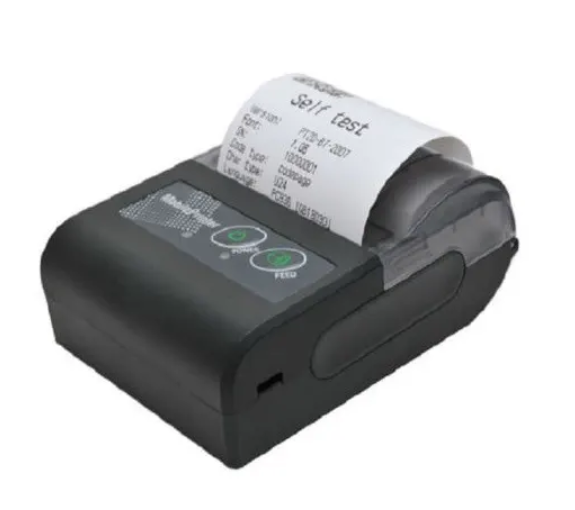
In this blog post, I want to share with you about the Bluetooth printer connected to your phone.
Imagine being able to print important documents, vivid photos directly from your phone, or even shipping tags directly from your phone, without the need for messy cables or bulky settings. This is not a futuristic fantasy. This is the reality that Bluetooth printers offer, effortlessly connected to a smartphone.
As a deeply ingrained blogger, I have witnessed first-hand how these compact and smart devices revolutionize the way we handle printing tasks. They transformed the concept of “printer” from a static office fixture to a truly portable powerhouse, freeing us from the scope of traditional printing methods.
How does a Bluetooth printer connected to your phone work
At the heart of the Bluetooth printer is a printing device equipped with Bluetooth technology, allowing it to communicate wirelessly with other Bluetooth-enabled devices, most famous smartphones and tablets. Unlike traditional printers that rely on USB cables or Wi-Fi networks, Bluetooth printers establish direct, short-range wireless connections with your phone.
The connection process is very simple and usually involves the following steps:
- Enable Bluetooth on your phone: Navigate to your phone’s settings and turn on Bluetooth. Your phone will then start searching for nearby Bluetooth devices.
- Turn on the Bluetooth printer: Power on the printer and make sure its Bluetooth function is active (usually indicated by a flashing or solid LED light).
- Pairing devices: On your phone, you will see a list of available Bluetooth devices. Select the name of the printer from this list. You may be prompted for a pairing code (usually 0000 or 1234, but please check the printer’s manual).
- Install the printer application (if required): Many Bluetooth printers, especially portable printers, have dedicated mobile applications. These applications are crucial because they provide an interface for selecting documents, photos, or labels to print, adjust settings, and monitor ink/paper levels. Download the mobile printing app from your phone’s app store (Android’s Google Play Store, iOS Apple App Store).
- Start printing! Once you have paired and set up the app, you can now send print jobs directly from your phone to your Bluetooth printer.
The beauty of Bluetooth connection lies in its simplicity and independence. You don’t need a Wi-Fi router, Internet connection or even a computer. As long as your phone and printer are within Bluetooth range (usually up to 10 meters, although newer Bluetooth versions offer greater range and stability), you can print well.
Benefits of connecting to a Bluetooth printer for your phone
There are several benefits to using a Bluetooth printer with your phone:
one. Wireless and portable
Say goodbye to the bulky cables and tangled ropes. The Bluetooth printer is compact and effortlessly connected to a smartphone.
b. Ideal for instant printing
Whether you are printing sales receipts, delivery notes, or inventory labels, there is a Bluetooth printer (such as a Bluetooth thermal printer) – 58mm ensures you are always ready.
c. Simple compatibility
Most modern Bluetooth printers work seamlessly with Android and iOS devices.
d. Battery Driver
Many models, such as 58mm hot plate printers, come with rechargeable batteries – perfect for on-site work and outdoor use.
e. No ink required
Thermal Bluetooth printer uses thermal paper instead of ink or toner to save you money on the ink cartridges.
Types of Bluetooth printers connected to the phone
Thermal receipt printer
Ideal for printing receipts, invoices, POS tickets and logistics records. No ink required. Recommended: Bluetooth Hot Plate Printer – 58mm
Photo printer
A small printer for printing 2×3 or 4×6 photos prints directly from your phone.
Label printer
Used to print barcodes, address labels, product labels, etc.
Inkjet/laser Bluetooth printer
Larger printers for full document printing, usually found in offices or houses.
Bluetooth printer connected to phone: Recommended
If you are looking for a reliable, budget-friendly Bluetooth printer that connects effortlessly to your phone, one of the most popular and universal options is the Bluetooth Thermal Printer – 58mm

Bluetooth Hot Board Printer – 58mm
type: Thermal receipt printer
Paper size: 58mm
Connectivity: Bluetooth
The best: receipt, POS system, invoice
price:₦32,000 – ₦45,000
Why we like it: Portable, without ink, used with RAWBT and POS applications
Buy: Bond form
Price of Bluetooth printer connected to the phone
The price of a Bluetooth printer connected to the phone may vary depending on the brand, model, feature, where you purchased it, or the brand you purchased from locally or imported from Amazon.
As of this post, the price of Bluetooth thermal printers – Nigeria 58mm is 32,000 – ₦45,000.
You can read the price of Bluetooth printers in Nigeria for more information.
Where to buy a Bluetooth printer connected to your phone
If you want to buy a Bluetooth printer connected to your Nigerian phone, here are some popular options:
- Jumia:Jumia is one of the largest e-commerce platforms in Nigeria, and it offers a wide range of Bluetooth printers from top brands.
- Mongolian: Konga is another popular e-commerce platform in Nigeria, which carries a variety of Bluetooth printers.
- Amazon: Although Amazon may not ship directly to Nigeria, you can still purchase a Bluetooth printer from Amazon and ship it to a forwarding address.
- Local e-shop: You can also visit local electronic stores in Nigeria such as Computer Village, Ikeha-Lagos; Bannex Wuse Market Abuja.
You can buy a Bluetooth hotboard printer in Konga here – Nigeria 58mm.
Suggestions for connecting to a phone on Amazon for Bluetooth printers
Here are some of the highest rated Bluetooth printers that can be connected to phones available on Amazon:
Munbyn Bluetooth Receipt Printer, 58mm
Mini wireless POS thermal printer for Android/Windows.
Click to buy now!
HP OfficeJet 250 mobile phone all-in-one printer
This compact printer provides high-quality printing, scanning and copying and is compatible with Android and iOS devices.
Brother Pocketjet 763 Mobile Printer
This super large printer is perfect for compatibility with Android and iOS devices. It is a hot A4 printer.
Canon Pixma IP110 wireless mobile printer
This compact printer offers high-quality printing and is compatible with Android and iOS devices. Click here to buy now!
Epson Workforce WF-100W Mobile Printer
This portable printer provides fast printing speeds and high-quality printing and is compatible with Android and iOS devices.
How to use a Bluetooth printer connected to your phone?
Read this blog post here.
Hopefully you find this guide helpful in searching for Bluetooth printers connected to your phone. Happy Print!
